
Raccoon: Tool for Reconnaissance and Information Gathering
Features DNS details DNS visual mapping using DNS dumpster WHOIS information TLS Data – supported ciphers, TLS versions, certificate details and SANs Port Scan Services and scripts scan URL fuzzing and dir/file detection Subdomain enumeration – uses Google dorking, DNS dumpster queries, SAN discover
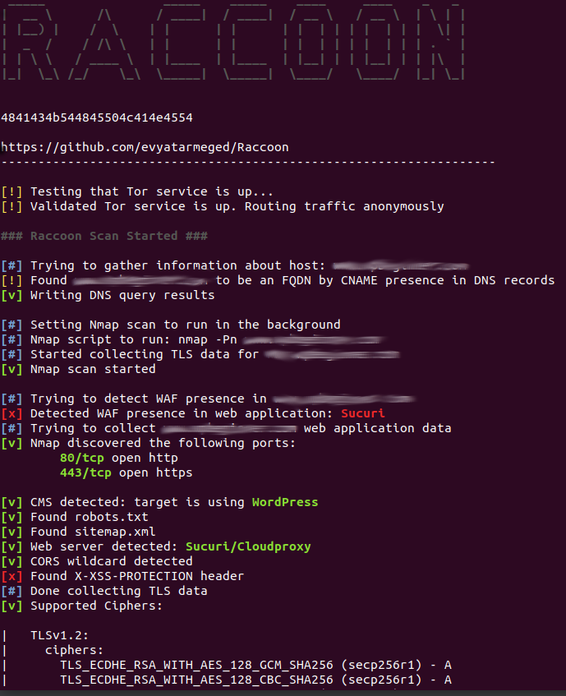
Features
- DNS details
- DNS visual mapping using DNS dumpster
- WHOIS information
- TLS Data – supported ciphers, TLS versions, certificate details and SANs
- Port Scan
- Services and scripts scan
- URL fuzzing and dir/file detection
- Subdomain enumeration – uses Google dorking, DNS dumpster queries, SAN discovery and bruteforce
- Web application data retrieval:
- CMS detection
- Web server info and X-Powered-By
- robots.txt and sitemap extraction
- Cookie inspection
- Extracts all fuzzable URLs
- Discovers HTML forms
- Retrieves all Email addresses
- Detects known WAFs
- Supports anonymous routing through Tor/Proxies
- Uses asyncio for improved performance
- Saves output to files – separates targets by folders and modules by files
Roadmap and TODOs
- Support multiple hosts (read from file)
- Rate limit evasion
- OWASP vulnerabilities scan (RFI, RCE, XSS, SQLi etc.)
- SearchSploit lookup on results
- IP ranges support
- CIDR notation support
- More output formats
About
Raccoon is a tool made for reconnaissance and information gathering with an emphasis on simplicity.
It will do everything from fetching DNS records, retrieving WHOIS information, obtaining TLS data, detecting WAF presence and up to threaded dir busting and subdomain enumeration. Every scan outputs to a corresponding file.
As most of Raccoon’s scans are independent and do not rely on each other’s results, it utilizes Python’s asyncio to run most scans asynchronously.
Raccoon supports Tor/proxy for anonymous routing. It uses default wordlists (for URL fuzzing and subdomain discovery) from the amazing SecLists repository but different lists can be passed as arguments.
For more options – see “Usage”.
Installation
For the latest stable version:
pip install raccoon-scanner
Or clone the GitHub repository for the latest features and changes:
git clone https://github.com/evyatarmeged/Raccoon.git
cd Raccoon
python raccoon_src/main.py
Prerequisites
Raccoon uses Nmap to scan ports as well as utilizes some other Nmap scripts and features. It is mandatory that you have it installed before running Raccoon.
OpenSSL is also used for TLS/SSL scans and should be installed as well.
Usage
Usage: raccoon [OPTIONS]

Options:
  --version                      Show the version and exit.
  -t, --target TEXT              Target to scan  [required]
  -d, --dns-records TEXT         Comma separated DNS records to query.
                                 Defaults to: A,MX,NS,CNAME,SOA,TXT
  --tor-routing                  Route HTTP traffic through Tor (uses port
                                 9050). Slows total runtime significantly
  --proxy-list TEXT              Path to proxy list file that would be used
                                 for routing HTTP traffic. A proxy from the
                                 list will be chosen at random for each
                                 request. Slows total runtime
  --proxy TEXT                   Proxy address to route HTTP traffic through.
                                 Slows total runtime
  -w, --wordlist TEXT            Path to wordlist that would be used for URL
                                 fuzzing
  -T, --threads INTEGER          Number of threads to use for URL
                                 Fuzzing/Subdomain enumeration. Default: 25
  --ignored-response-codes TEXT  Comma separated list of HTTP status code to
                                 ignore for fuzzing. Defaults to:
                                 302,400,401,402,403,404,503,504
  --subdomain-list TEXT          Path to subdomain list file that would be
                                 used for enumeration
  -S, --scripts                  Run Nmap scan with -sC flag
  -s, --services                 Run Nmap scan with -sV flag
  -f, --full-scan                Run Nmap scan with both -sV and -sC
  -p, --port TEXT                Use this port range for Nmap scan instead of
                                 the default
  --tls-port INTEGER             Use this port for TLS queries. Default: 443
  --skip-health-check            Do not test for target host availability
  -fr, --follow-redirects        Follow redirects when fuzzing. Default: True
  --no-url-fuzzing               Do not fuzz URLs
  --no-sub-enum                  Do not bruteforce subdomains
  -q, --quiet                    Do not output to stdout
  -o, --outdir TEXT              Directory destination for scan output
  --help                         Show this message and exit.