
WP2Shell Vulnerability Checker – Test Your WordPress in Seconds
Check your WordPress site vulnerable to WP2Shell. Instant version checker, patch steps, WAF rules, detection scripts and IOCs for CVE-2026-63030 / CVE…
Check whether a WordPress version is exposed to WP2Shell (CVE-2026-63030 + CVE-2026-60137), the unauthenticated pre-auth RCE chain. Runs entirely in your browser – nothing is uploaded or logged.
Find it in Dashboard → Updates, or at the bottom-right of any wp-admin screen.
Reads the site’s public version signals (readme, generator tag, RSS feed) through a privacy-friendly relay to get around browser cross-domain limits. Some sites deliberately hide their version – if so, you’ll be told. Only scan sites you own or are authorised to test.
| 6.9.0 – 6.9.4 | Vulnerable (RCE) |
| 7.0.0 – 7.0.1 | Vulnerable (RCE) |
| 6.8.0 – 6.8.5 | SQLi only |
| 7.0.2 / 6.9.5 / 6.8.6 | Patched |
| Below 6.8.0 | Not affected |
For research & site-admin defensive use. Not affiliated with the WordPress Foundation. Data reflects the 17 Jul 2026 emergency releases.
If you run a WordPress site, WP2Shell is the vulnerability you cannot afford to ignore. Tracked as CVE-2026-63030 and chained with the SQL injection flaw CVE-2026-60137, it lets a completely anonymous attacker — no login, no plugin, no special setup — run their own code on your server. WordPress powers over 500 million sites, and public exploit code is already circulating, so the only question that matters right now is a simple one: is my version exposed?
The free checker above answers that instantly. Type in your WordPress version (you'll find it under Dashboard → Updates, or in the bottom-right corner of any wp-admin screen) and it tells you immediately whether you are in the vulnerable range.
WP2Shell (CVE-2026-63030): Checker, Patch & Detection Guide
It flags the full remote-code-execution risk for versions 6.9.0–6.9.4 and 7.0.0–7.0.1, the SQL-injection-only exposure on the 6.8 branch and confirms when you are safely on a patched build (7.0.2, 6.9.5 or 6.8.6).
Everything runs entirely inside your own browser. Nothing you type is uploaded, stored, or logged — there is no server, no tracking, and no database on our end. You can also switch to the “Check a site URL” tab to look up the WordPress version of a site you own or are authorised to test.
This tool is built for site owners, administrators and security researchers who need a fast, no-nonsense answer. Remember: the checker tells you your risk — the fix is to update WordPress immediately. Once you've checked, scroll down for the full patch steps, WAF rules, detection scripts and indicators of compromise.
Point it at an authorized target and the kill chain runs itself: recon → exploit → report, from a browser War Room or the CLI, driven by the agent you’re already signed into — Claude Code, Codex, Hermes — or a model you run fully offline (Ollama, LM Studio, vLLM). No new API keys, no cloud tenant, no second bill. Your agent is the brain; T3MP3ST is the war machine bolted around it. Self-hosted storm. Keyless warfare. ⚡

And it won’t ask you to take its word for it. On XBOW’s own 104-challenge suite it scores 90.1% pass@1 — above XBOW’s self-reported 85% — alongside hint-free CTF solves and a cold hunt on real, post-cutoff CVEs the model had never seen. Every number in this README recomputes from committed data with one command (npm run verify-claims). Loud about the mission, honest about the build — the status table says exactly what’s live, what’s scaffolding, and what’s still roadmap; full receipts in Benchmarks.
Three things set it apart:
Reproducible. Every number in this README recomputes from committed data — npm run verify-claims re-derives all of them, 24/24 green. A claim that can’t be reproduced doesn’t ship. No trust-me numbers, ever.
Keyless. The AI coding agent already on your machine is the backbone. No API keys, no second bill, no gatekeeper.
Honest about scope. The status table marks exactly what’s stable, experimental, or roadmap — because red-teaming shouldn’t be a priesthood, and it damn sure shouldn’t run on vibes.
⚠️ Authorized use only
T3MP3ST is an offensive security tool, built for authorized testing, research, and education. Point it only at systems you own or have explicit, written permission to test. Unauthorized access to computers, networks, or data is illegal in most jurisdictions — you alone are responsible for how you use this software and for staying inside the law and your rules of engagement. Bring the storm to your targets, not someone else’s.
T3MP3ST is provided as-is under the AGPL-3.0 license, with no warranty and no liability for any damage, loss, or misuse. The authors do not endorse, support, or condone unauthorized activity. Get permission. Stay in scope. Don’t be a menace. 🫡
| Domain | What it does | Status |
|---|---|---|
| 🕸️ Web apps | Black-box, external-attacker recon → exploit (XBEN suite) | ✅ Stable |
| 🚩 CTF | Hint-free, sandbox-jailed solves (Cybench) | ✅ Stable |
| 🤖 Robotics / OT / embedded | Coordinated-disclosure pipeline for OSS vuln hunting (OSV + live-PoC + refuter) | ✅ Pipeline stable |
| 📂 Source code | White-box repo analysis with blind master-builder decomposition | ⚠️ Python-only ingest |
| 💰 Smart contracts | Damn Vulnerable DeFi | ⚠️ reproduction, not novel discovery |
| ☁️ Cloud (IaC) | Misconfig-detection benchmark (cloud:bench) + opt-in cloud arsenal (aws/az/gcloud + scoutsuite/cloudfox/pmapper; pacu gated) | 🚧 IaC-misconfig scaffolding — live-cloud exploitation not yet benchmarked |
| 📱 Mobile | Built-in static analyzer (manifest misconfig + secret/cleartext detection, mobile:bench) + opt-in arsenal (mobsfscan/objection/drozer; frida gated) | 🚧 static-detection scaffolding — dynamic exploitation not benchmarked |
| 🔩 Binary / RE | Decompiled-output sink detector (unsafe-copy / format-string / cmd-injection / int-overflow, binary:bench) + opt-in arsenal (ghidra/radare2/objdump/checksec/strings; gdb gated) | 🚧 static sink-detection scaffolding — solving/pwn not benchmarked |
Fastest path to a running War Room (keyless, ~2 min to set up; mission time depends on the target):
npm install
npm run server # War Room → http://127.0.0.1:3333/ui/SightHouse is an open-source tool developed by Quarkslab that helps reverse engineers automatically identify known functions inside binaries by matching them with previously analyzed code.
SightHouse is a tool designed to assist reverse engineers by retrieving information and metadata from programs and identifying similar functions.
Reverse engineering modern software is complex due to:
This makes it difficult to distinguish custom logic vs reused components, often wasting time analyzing irrelevant code.
SightHouse tackles this by automating function identification using similarity matching.
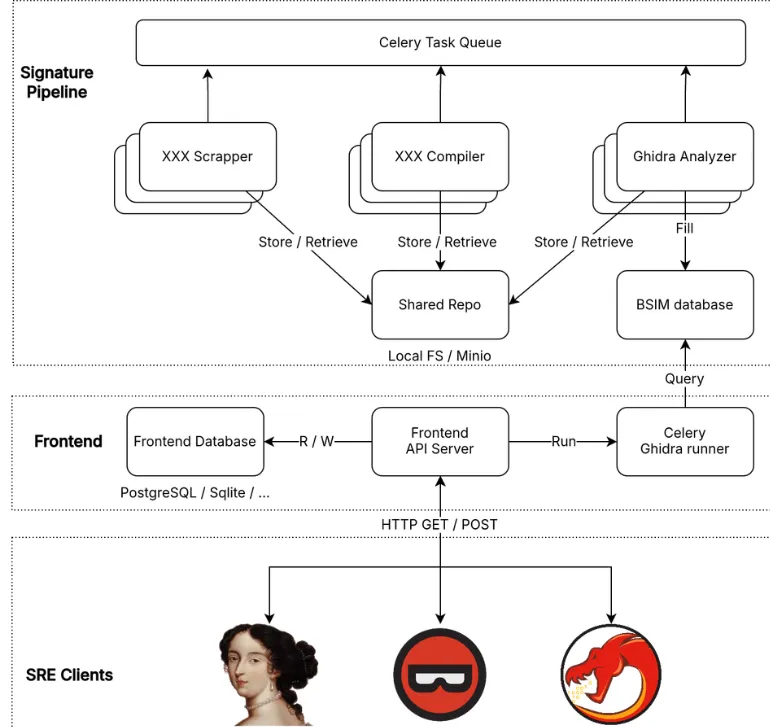
SightHouse is available on Pypi.
# Install SRE clients only
pip install sighthouse-client
# Install frontend only
pip install sighthouse-frontend
# Install pipeline only
pip install sighthouse-pipeline
# Or install everything
pip install sighthouse[all]You can also install it from the git repository:
# Download the repo
git clone https://github.com/quarkslab/sighthouse && cd sighthouse
# Make install will create a new virtual env and install sighthouse in it
make install SightHouse compares functions from a target binary with a large database of known function signatures. When a match is found:
It supports integration with:
SightHouse relies on the Binary Similarity problem, which involves detecting similar functions using:
After benchmarking multiple approaches, the tool uses BSIM (from Ghidra) as its core engine because:
SightHouse is built with three main components:
👉 The diagram on page 3 shows this pipeline workflow, including scrapers, compilers, analyzers, and storage systems working together.
CISO Assistant offers a fresh perspective on Cybersecurity Management and GRC (Governance, Risk, and Compliance) practices:

Upcoming features are listed on the roadmap.
CISO Assistant is developed and maintained by Intuitem, a company specializing in Cybersecurity, Cloud, and Data/AI.
Here’s an extract of some of the building blocks in CISO Assistant to illustrate the decoupling concept that encourages reusability:
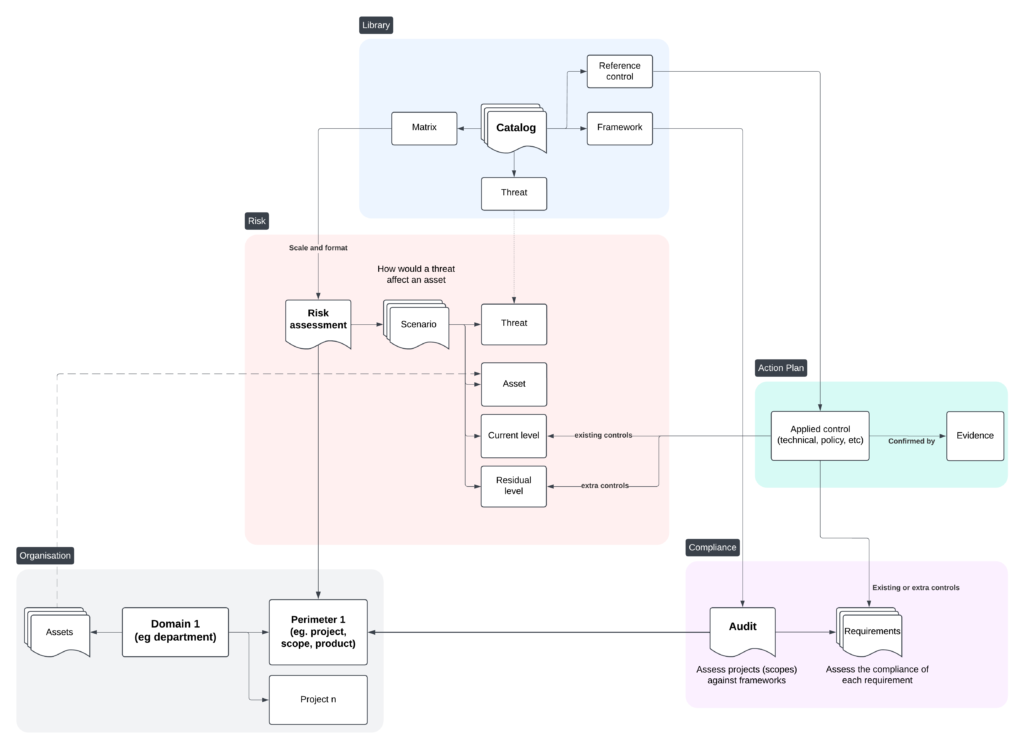
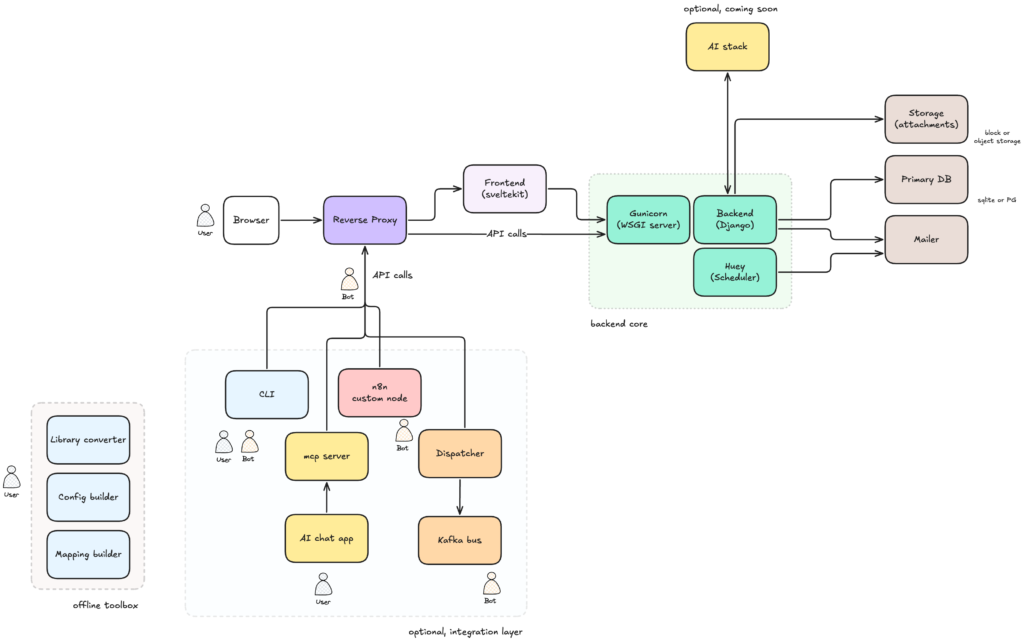
ISO 27001:2013 & 27001:2022 🌐
AndroHunter is a native Android application that provides a full suite of mobile security testing tools — all running directly on the device without requiring a rooted phone for most features. It is designed for security researchers participating in bug bounty programs (HackerOne, Yes We Hack, Intigriti, etc.) who need to analyze Android applications quickly and efficiently.
The tool covers the entire Android attack surface: static analysis (APK, DEX, Manifest), dynamic testing (Intent fuzzing, ContentProvider probing, Broadcast injection), runtime analysis (Frida script generation, SSL bypass), and network interception (HTTP proxy).
AndroHunter is intended for authorized security research, bug bounty programs, and educational purposes only. You must have explicit permission from the application owner before testing any target. The developer assumes no responsibility for misuse. Always comply with your bug bounty program’s scope and rules of engagement.
.dex files from APKsVULN / SUSP / SAFE)AndroidManifest.xml directly from the APK (no decompiler needed)file:///data/...)VULN (red) / SUSP (yellow) / SAFE (green)res/xml/ configuration files from APK to extract FileProvider path definitionsroot-path with empty path → CRITICAL (full filesystem access)external-path with empty path → HIGHcache-path / external-cache-path → MEDIUMContentResolver and reports file contents on successadb shell content read --uri '...' commandsadb shell am start -n pkg/activity --es data "payload"shared_prefs/*.xml files from target application data directoryrun-as for debug apps, falls back to dumpsys for otherstoken, password, secret, api_key, session, jwt, cookieFile.exists() hookjavax.crypto.Cipher — logs all encrypt/decrypt operationsSQLiteDatabase.rawQuery, execSQL, queryHttpURLConnectionfrida -U -f com.target.app -l script.js --no-pauseandroid sslpinning disablenetwork_security_config.xml via apktool127.0.0.1:8877Authorization, Cookie, Token shown in redid, whoami, uname -a, env, ifconfig, netstat -an, ps, ls /datarun-as: enables SharedPrefs reading on non-debug appsThis project implements the research from the paper “Careless Whisper: Exploiting Silent Delivery Receipts to Monitor Users on Mobile Instant Messengers” by Gabriel K. Gegenhuber, Maximilian Günther, Markus Maier, Aljosha Judmayer, Florian Holzbauer, Philipp É. Frenzel, and Johanna Ullrich (University of Vienna & SBA Research).
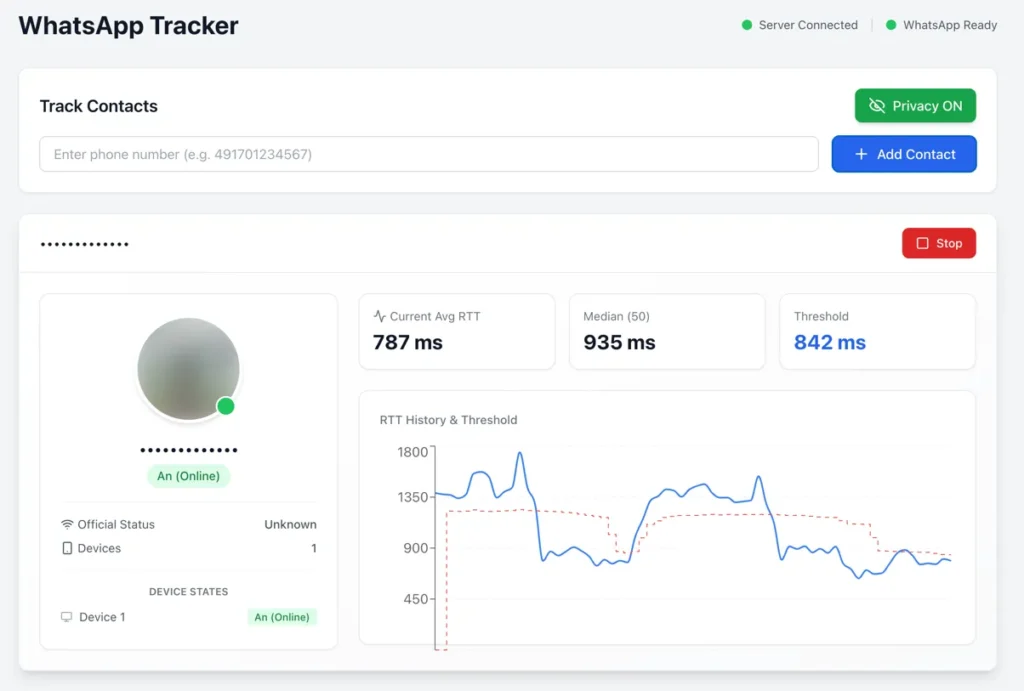
What it does: By measuring Round-Trip Time (RTT) of WhatsApp message delivery receipts, this tool can detect:
Security implications: This demonstrates a significant privacy vulnerability in messaging apps that can be exploited for surveillance.
⚠️ DISCLAIMER: The tool is for educational and security research purposes only. Demonstrates privacy vulnerabilities in WhatsApp and Signal.
# Clone repository
git clone https://github.com/gommzystudio/device-activity-tracker.git
cd device-activity-tracker

# Install dependencies
npm install
cd client && npm install && cd ..
Requirements: Node.js 20+, npm, WhatsApp account
# Terminal 1: Start backend
npm run start:server

# Terminal 2: Start frontend
npm run start:client
Open http://localhost:3000, scan QR code with WhatsApp, then enter phone number to track (e.g., 491701234567).
npm start
Follow prompts to authenticate and enter target number.
Example Output:
╔════════════════════════════════════════════════════════════════╗
║ 🟡 Device Status Update - 09:41:51                             ║
╠════════════════════════════════════════════════════════════════╣
║ JID:        ***********@lid                                    ║
║ Status:     Standby                                            ║
║ RTT:        1104ms                                             ║
║ Avg (3):    1161ms                                             ║
║ Median:     1195ms                                             ║
║ Threshold:  1075ms                                             ║
╚════════════════════════════════════════════════════════════════╝
The tracker sends reaction messages to non-existent message IDs, which triggers no notifications at the target. The time between sending the probe message and receiving the CLIENT ACK (Status 3) is measured as RTT. Device state is detected using a dynamic threshold calculated as 90% of the median RTT: values below the threshold indicate active usage, values above indicate standby mode. Measurements are stored in a history and the median is continuously updated to adapt to different network conditions.
auth_info_baileys/ folder and re-scan the QR code.The most effective mitigation is to enable “Block unknown account messages” in WhatsApp under Settings → Privacy → Advanced.
This setting may reduce an attacker’s ability to spam probe reactions from unknown numbers, because WhatsApp blocks high-volume messages from unknown accounts. However, WhatsApp does not disclose what “high volume” means, so this does not fully prevent an attacker from sending a significant number of probe reactions before rate-limiting kicks in.
Disabling read receipts helps with regular messages but does not protect against this specific attack. As of December 2025, this vulnerability remains exploitable in WhatsApp and Signal.
WhatsApp TrackerAdvanced OSINT Tool - Search Usernames Across 400+ Social Media Platforms
Searching across 400+ platforms...
A Username Finder Tool is an advanced OSINT (Open Source Intelligence) application that allows you to search for usernames across multiple social media platforms and online services simultaneously. Our tool leverages cutting-edge technology to scan over 400+ platforms including Facebook, Instagram, Twitter, TikTok, LinkedIn, YouTube, Discord, and many more.
🚀 Why Choose Our Username Finder? Unlike basic search tools, our platform provides comprehensive results with real-time verification, making it the most reliable username lookup service available in 2024.
Our Username Finder Tool utilizes advanced algorithms and API integrations to perform comprehensive username searches across the internet. Here's how the process works:
⚡ Lightning Fast Results: Our optimized search engine delivers results in seconds, not minutes. The server-side processing ensures maximum speed and reliability.
Security analysts and law enforcement agencies use username finder tools for digital investigations, tracking suspects, and gathering evidence from social media platforms. Our tool helps identify connected accounts and digital footprints across multiple platforms.
Professional investigators rely on username lookup tools for background checks, missing person cases, and fraud investigations. The comprehensive search capabilities make it an essential tool for OSINT research.
Marketing professionals use username finders to:
Cybersecurity professionals utilize username search tools to identify potential threats, track malicious actors, and investigate security breaches. The tool helps in threat intelligence gathering and digital forensics.
Human resources teams use username finders for candidate background verification, ensuring comprehensive social media screening during the hiring process.
Our Username Finder searches across an extensive range of platforms including:
Unlike basic username checkers, our tool provides real-time verification of username existence and availability. This ensures you get the most accurate and up-to-date information available.
🎯 Pro Tip: Use variations of usernames (with numbers, underscores, or periods) to find all possible accounts associated with a person or brand.
We prioritize user privacy and data security:
Our Username Finder Tool should be used responsibly and ethically:
🏆 Why We're the Best Username Finder Tool in 2024:
We continuously update our platform database and improve search algorithms to ensure you always have access to the most comprehensive username search capabilities available.
Yes! Our Username Finder Tool is completely free with unlimited searches. No registration, no hidden fees, no premium tiers.
Our tool provides highly accurate results with real-time verification. However, some platforms may have privacy settings that limit public visibility.
Absolutely! This PHP version is specifically designed to be WordPress compatible and can be easily integrated into any WordPress site.
Yes, searching public information is legal. Our tool only accesses publicly available data and respects platform terms of service.
We update our platform database weekly to include new social media platforms and remove defunct services.
PyXL is a custom hardware processor that executes Python directly — no interpreter, no JIT, and no tricks. It takes regular Python code and runs it in silicon.
A custom toolchain compiles a .py file into CPython ByteCode, translates it to a custom assembly, and produces a binary that runs on a pipelined processor built from scratch.
It’s a real processor for Python, built for determinism and speed.
PyXL runs on a Zynq-7000 FPGA (Arty-Z7-20 dev board). The PyXL core runs at 100MHz. The ARM CPU on the board handles setup and memory, but the Python code itself is executed entirely in hardware.
The toolchain is written in Python and runs on a standard development machine using unmodified CPython.
GPIO stands for General Purpose Input/Output. It’s a simple hardware pin that software can read from or write to — a way to control the outside world: LEDs, buttons, sensors, motors, and more.
In MicroPython (like on the PyBoard), your Python code interacts with C functions that handle hardware registers underneath. It’s reasonably fast, but still goes through a Python VM and a software stack before reaching the pin.
PyXL skips all of that. The Python bytecode is executed directly in hardware, and GPIO access is physically wired to the processor — no interpreter, no function call, just native hardware execution.
from compiler.intrinsics import *


def main():
    pyxl_write_gpio_pin1(0)              # Reset output pin

    c1 = pyxl_get_cycle_counter()        # Cycle counter (100 MHz)

    pyxl_write_gpio_pin1(1)              # Set output pin
    while pyxl_read_gpio_pin2() == 0:    # Wait until input pin is set to 1
        continue

    c2 = pyxl_get_cycle_counter()        # Cycle counter (100 MHz)

    return (c2 - c1) * 10                # Return result in nano seconds (each cycle is 10 ns)
As you can see, this is a regular Python program, but it also has some unfamiliar function calls. These functions originate from compiler.intrinsics module.
pyxl_get_cycle_counter()
Gets the current cycle counter from the PyXL CPU. This counter advances by 1 on every tick
pyxl_write_gpio_pin1()
Writes a value (0/1) to a GPIO pin. These are low-level intrinsics exposed by the compiler — currently hardcoded for this test, but will evolve into a more general pyxl_gpio_write(pin, value) API.
pyxl_read_gpio_pin2()
Reads the value from Pin2. The same API comment is true here as well.
As described above, the program is compiled using a CPython Bytecode and then recompiled using PyXL assembly. It is then linked together, and a binary is generated.
This binary is sent via network to the Arty board, where an ARM CPU gets the application, copies it to a shared memory with the PyXL HW, and starts running it.
A typical Python runtime (CPython or MicroPython in case of the PyBoard or Python for embedded in general) has a big overhead caused by running the ByteCode on a software-based VM. In PyXL, there’s no VM; the HW does everything.
As for reading and writing the GPIO, the GPIO headers are directly mapped to FPGA pins, and physically wired into PyXL’s core top-level module. Think of it as the main function of the HW.
In this test, all code and data reside in predictable, low-latency memory, ensuring deterministic behavior (real-time behavior). This means that for the same input, it’ll take the exact same time to run.
PyXL
CF-Hero is a comprehensive reconnaissance tool developed to discover the real IP addresses of web applications protected by Cloudflare. It gathers multi-source intelligence through various methods.
The tool analyzes data from these sources to identify potential origin IP addresses of Cloudflare-protected targets. It validates findings through response analysis to minimize false positives.
OSINT is another technique to find the real IP of any domain that is behind CloudFlare. There are lots of unique search engines for special purposes. Shodan and Censys are two of these. They provide more detail and technical information.
These search engines continuously scan the whole internet and discover new assets or monitor and log asset changes. When a domain not behind Cloudflare gets up, both engines can log the domain’s real IP. After a while, if the domain takes behind Cloudflare, their IP can be found using these search engines.
CF-Hero checks censys and shodan too. (Note that when you use these services, you have some limits due to API quotas.)
The other trick is the (sub)domain technique. Actually, It doesn’t have to be a subdomain.n It can be domain as well. The key point is here; domains should belong to the same company.
Let’s say we have 2 domains. One of them is behind Cloudflare, but the other is not. In this case, you connect to the domain, not the one behind Cloudflare, and then change the host header to the domain behind Cloudflare. If you get a response from applications behind Cloudflare, congratulations, you bypassed Cloudflare. You cannot access web applications from IP directly anymore. (and of course,e that also depends on the configuration)

cf-hero requires go1.18 to install successfully. Run the following command to install.
go install -v github.com/musana/cf-hero/cmd/cf-hero@latest
Usage:
cf-hero [flags]

HExHTTP is a tool designed to perform tests on HTTP headers and analyze the
results to identify vulnerabilities and interesting behaviors.
pip install -r requirements.txt
./hexhttp.py -u 'https://target.tld/'
# OR
python3 hexhttp.py -u 'https://target.tld/''
docker build -t hexhttp:latest .
docker run --rm -it --net=host -v "$PWD:/hexhttp/" hexhttp:latest -u 'https://target.tld/'
  Usage: hexhttp.py [-h] [-u URL] [-f URL_FILE] [-H CUSTOM_HEADER] [-A USER_AGENT] [-F] [-a AUTH] [-b]

HExHTTP is a tool designed to perform tests on HTTP headers.

options:
  -h, --help            show this help message and exit
  -u URL, --url URL     URL to test [required]
  -f URL_FILE, --file URL_FILE
                        File of URLs
  -H CUSTOM_HEADER, --header CUSTOM_HEADER
                        Add a custom HTTP Header
  -A USER_AGENT, --user-agent USER_AGENT
                        Add a custom User Agent
  -F, --full            Display the full HTTP Header
  -a AUTH, --auth AUTH  Add an HTTP authentication. Ex: --auth admin:admin
  -b, --behavior        Activates a simplified version of verbose, highlighting interesting cache behaviors
  -hu HUMANS, --humans HUMANS
                        Performs a timesleep to reproduce human behavior (Default: 0s) value: "r" or "random"
  -t THREADS, --threads THREADS
                        Threads numbers for multiple URLs. Default: 10
  -l LOG, --log LOG     Set the logging level (DEBUG, INFO, WARNING, ERROR, CRITICAL)
  -L LOG_FILE, --log-file LOG_FILE
                        The file path pattern for the log file. Default: logs/
  -v, --verbose         Increase verbosity (can be used multiple times)
Check your WordPress site vulnerable to WP2Shell. Instant version checker, patch steps, WAF rules, detection scripts and IOCs for CVE-2026-63030 / CVE…
A multi-agent offensive-security framework, built to turn the AI coding agent you already run into a zero-day hunter.
SightHouse is an open-source tool developed by Quarkslab that helps reverse engineers automatically identify known functions inside binaries by matchi…
CISO Assistant offers a fresh perspective on Cybersecurity Management and GRC (Governance, Risk, and Compliance) practices: Designed as a ce…